

While YouTube remains the largest video hosting platform on the web, Facebook — taking advantage of its huge user base — is quickly catching up to become one of the most popular places to view video content. As a WordPress user, you can take advantage of Facebook’s popularity to serve your viewers with content that’s connected to its huge social media network by embedding Facebook video content right into your WordPress posts and pages.
While it’s possible to upload video content to WordPress by using the Add Media feature, it is almost always preferable to embed videos from a platform like Facebook. For one, it greatly reduces the amount of bandwidth used by your server, improving your website’s speed. It also gives users the ability to take advantage of social media features of that platform, such as having it appear as a recommended video or engaging in discussion, which is especially great if the video is your own content.
Step 1: Locate your video and get the link address
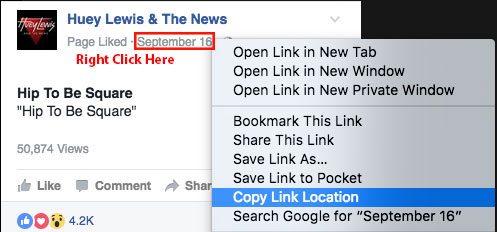
The first thing we’ll need to do is get the link address from the video you want to embed on your WordPress site. You can do this easily by browsing to the video on Facebook, then right clicking the date and copying the link, as shown below.
Step 2: Generate the video player code
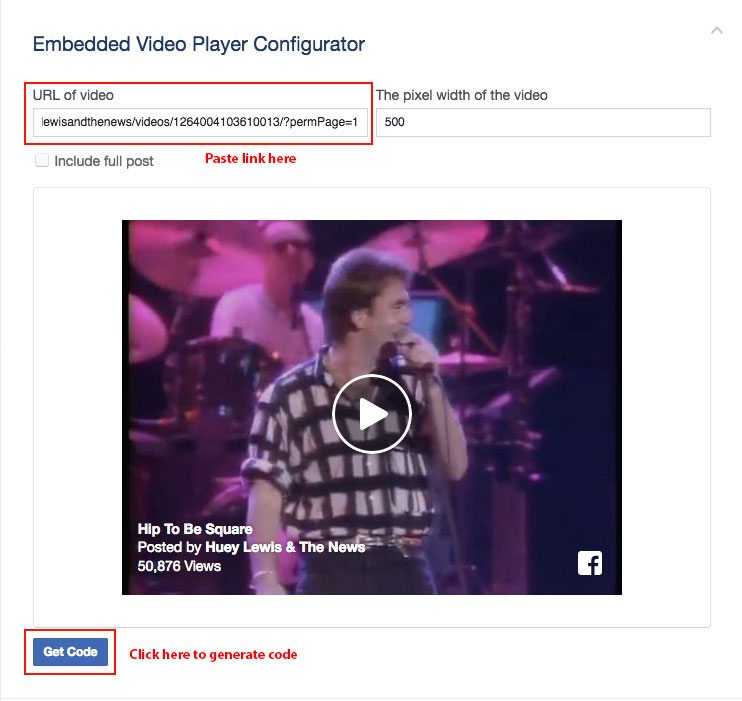
Next, we’ll use the link we copied from the Facebook video to generate a video player code by visiting Facebook’s Embedded Video and Live Video Player page. Scroll down to the section titled Embedded Video Player Configurator, paste the link into field labeled “URL of video,” then click the “Get Code” button at the bottom.
Step 3: Include the JavaScript SDK in the header
The first time you embed a Facebook video you will need to make sure Facebook’s JavaScript SDK is included in your website’s header. This is the code that will give your website the ability to embed videos from Facebook. You will only need to do this step once.
There are a few ways to include the SDK in the site’s header. One way is to edit the header.php of your site’s child theme. If you’re not using a child theme, you should be! One of the advantages of doing so is being able to easily include scripts, like in this example, without risk of them being overwritten when your theme needs to be updated.
To include the SDK in your site’s header, copy the first section of code you generated by pressing the “Get Code” button…
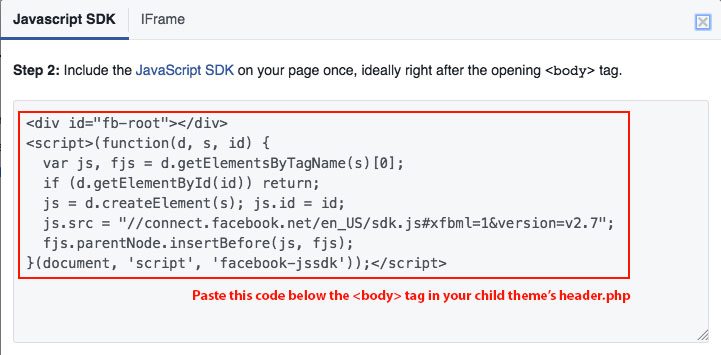
And pasting it anywhere beneath the the <body> tag in your child theme’s header.php. For example:

If for some reason you’re not using a child theme, or you don’t want to manually edit the header.php, you can use a plugin, such as the Header and Footer plugin, to do so.
Step 4: Embed the video with the generated code
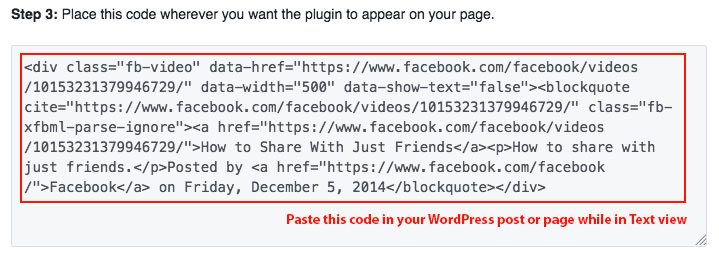
Once your site is loading Facebook’s JavaScript SDK, embedding the video of your choice is a piece of cake. Just paste the second part of the code you generated on the Embedded Video and Live Video Player page anywhere into your post or page. Make sure you are in Text view when you do so, as you would when using any kind of html or shortcode.
Tip: You can center the video by adding the class
aligncenterto thedivof the video embed, for example:<div class="fb-video aligncenter"
Once that code is there, your video should show up embedded in the post.
When it comes to getting customers, selling your product or service, or growing your business one thing hasn’t changed: there is no free lunch.
From the outset of “internet marketing” the fantasy of marketers has been that somehow, internet marketing was cheap, free, or easy. Build an email list and blast away. “IT’S FREE” compared to direct mail, or build an online store and never have to pay a salesperson again as the money just keeps rolling in. You get the picture.
The reality is that you still have to spend money to make money, and that someone has to spend the time to put all this in place. The old way was to have a marketing department or hire an ad agency or some combination of the two. You’d buy media from the short list of options: TV, Radio, Print, Direct, Outdoor, the Yellow Pages (remember those) and off you went. Those days are over.
When we first started teaching Websitetology in 2005, it was all about organic search optimization. We were among the first people talking about content marketing, the idea of creating content that would bring your customers to you. Make it good, make it useful and make it accessible.
To Search or not to Search? That is the question.
To this day, I still run into at least ten examples a day of companies that don’t have a clue on how to properly present their products or services online. Today, I was looking for information on an older, but still serviceable video projector. A search of the the product name should have taken me directly to the manufacturers site where I would find the original product specs, the replaceable parts and part numbers, any advertising that went with it, press releases, links to reviews, a community help forum that’s well moderated, and the manuals available as a PDF download for free. I should also find the replacement for it if it’s been discontinued, and information on how and where to buy.
What did I find? Surprise, nothing. A few review sites, with not a lot of content. In 2000, this projector retailed for $15,000. Now, it’s an orphan. The company has not only forgotten its child, but written it out of the will, as in goodwill. Someone who had this product, was pleased with it, has no reason to connect or reconnect with this company and to consider them for a replacement. Could you imagine Harley Davidson giving up on an older bike, or an existing customer? Not on your life.
This is the fundamental of search marketing, driven by good content. Having people looking for your products, your company, your services, yourself, find you and be on your site, not anyone else’s. Your site should be the first (and last place) anyone looks for information about your company or products.
The short answer is, your company has to be at the top of search. It’s not really negotiable. Over 60% of your customers start their purchase decision via search.
To Social, or not to Social? Is that a question?
Social was also supposed to be “free.” If you talk about yourself enough, someone will hear, and access was “FREE.” All of a sudden, everyone was a social media guru.
Just like the Apple Macintosh was supposed to turn us all into publishers, sitting a million monkeys down at typewriters won’t get you “War and Peace” no matter how many bananas you give them.
Social is, and always was supposed to be a 2-way conversation between your company and your community. But, that doesn’t mean success is measured in mentions, or retweets or any other social metric. It’s still measured the old fashioned way, if your cash register is ringing. Social campaigns will never overtake search because Search in and by itself is the first step in an actual decision to buy something. We like to refer to Google as a database of human intentions. If you’re searching, it’s usually followed up by direct interaction. Social media can be consumed passively and disposed of without ever leaving the original platform. That doesn’t put money in the bank, unless it’s the bank of goodwill.
Many “Social Media Gurus” talk about posting calendars and forcing content out at their pace- when in fact this is nothing but noise. As an example- it’s easy to talk about politics right now (it’s an election year) but, remember what you were told about dating- “stay away from politics and religion” because it’s almost always divisive. Social, when done well can contribute to sales quite effectively, but usually, only when the social interaction is taking place at the appropriate time and to the right audience.
Social or Search?
Yes, as in both. However, with proper objectives and reasonable goals in mind. First, always make sure you can and will be found, preferably before anyone else. We learned early the possibility to hijack our competitors customers by just providing better information about our competition than they or Google did. That’s right, why not optimize your site for bringing your competitions customers to your site? Who said the Yellow Pages or Google or anybody else had more of a right to share information than you? Make a well-maintained list of your competition and put it right on your site.
Then, don’t feel bad about jumping into your competitions social conversations about purchase decisions. If they decide to have their conversations with their customers out on the internet, it’s open season to interrupt their sales pitch.
We’ve got a lot more answers on how and what do to get in front of your customers and your competitions customers, but that’s due to our day job as an ad agency that specializes in doing the only two things that truly matter to an advertiser: we create lust and evoke trust, by guiding the conversations into our domain.
If you’d like more information on how this is done, our Websitetology Seminar is a good place to start.
This is the slide deck for my presentation at Summitup 2016- The Fight Club Networks. Are you in social media for the right reasons? Do you have a feedback loop? Are you engaging the right markets, with the right content, using the right tools?
We’ll have the video up soon.
To those who attended- and want to know when the video is going to be up- sign up for the newsletter- and thank you!
And note, even though we used SlideShare to host the prezo- we have the content on our site, to minimize the digital sharecropping. We also gain data from your clicks.