
Wordpress 2.9 video- and embedding video

Need a quick introduction to the new features in WordPress 2.9- watch the video:

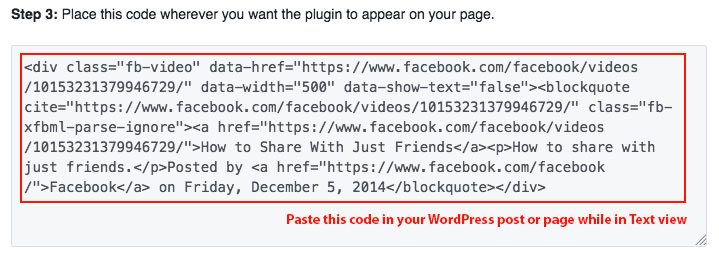
For the first time, I didn’t need to use viper007bond Viper’s Video Quicktags plugin to post this, since embedding is covered for a number of video sites. However- it’s still not as easy peasy as they say- I had to switch to HTML view to paste the “embed” code- to get it to work. The little filmstrip button which is supposed to “embed” media- still asks for the user to figure out what type of file they are embedding.

Somehow, even with Automattic (the publishers of WordPress) having a UX person on staff- the user interface is still more complex than it needs to be. I’m still looking at the four “Upload/Insert” buttons- and wondering why they need four buttons for the same controls (I thought I’d written a post about this- but, couldn’t find it).

Other cool features are the ability to crop and rotate images, update and compatibility check all plugins, and a few other cool little fixes. We’ve installed it on our sites- without problem so far (5 days). We’ll report any changes on that as we find them.

Tags: , , , | Categories: Word Press Interface, WordPress

WordPress 2.8.1 released

It wasn’t two weeks between 2.8 and 2.81. It seems a few things broke.

WordPress 2.8.1 fixes many bugs and tightens security for plugin administration pages. Core Security Technologies notified us that admin pages added by certain plugins could be viewed by unprivileged users, resulting in information being leaked. Not all plugins are vulnerable to this problem, but we advise upgrading to 2.8.1 to be safe.

via WordPress › Blog » WordPress 2.8.1.

We always try to wait a few days after a release to upgrade sites, just in case things break. The other issue is that plugins that you need may break. Always backup completely before doing an update to save yourself some headaches.

Tags: , | Categories: WordPress

Ross Perot uses Wordpress

Ross Perot is worried about our country. So he put up a website to present his ideas- the technology: wordpress

Why this web site now? Because we are running out of time.

The American people must wake up and face the reality that promises made in the past will soon bankrupt this nation

Perot Charts » Charting Government Fiscal Irresponsibility.

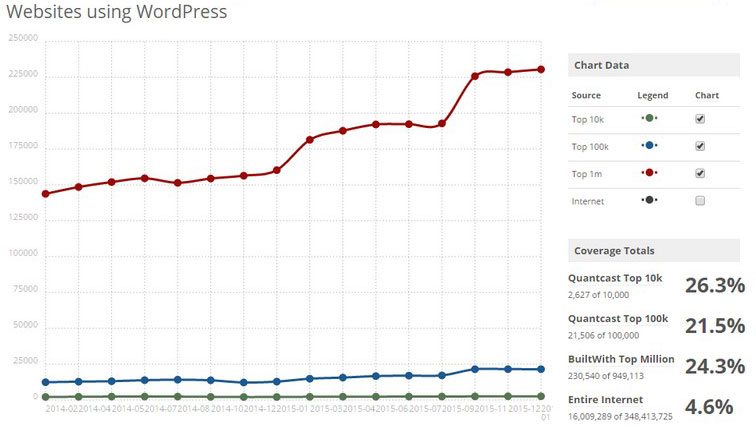
People and businesses who want to be heard on the web- use Wordpress.

Everyone else, pays too much.

Take it from Ross- he’s known to be a miser.

Categories: Build a better site, WordPress

WordPress good enough for Government work.

This post would have been a lot more interesting if all the sites using WordPress were linked-but, I believe that the list is probably right. My only question is why haven’t any of these government agencies hired The Next Wave to do their sites- since we are an SDVOB and HUBzone?

Here is a list (probably not all-inclusive) of United States government agencies or organizations using WordPress (whether privately or publicly):

* Air Force

* Army

* Central Intelligence Agency (CIA)

* Coast Guard

* Defense Intelligence Agency

* Department of Energy

* Department of Homeland Security

* Department of State

* Department of Treasury

* Drug Enforcement Agency (DEA)

* Marine Corps

* Federal Bureau of Investigation (FBI)

* National Geospatial Intelligence Agency

* National Reconnaissance Agency

* National Security Agency (NSA)

* Navy

This list was revealed at WordCamp San Francisco, 2008.

U.S. Government Agencies Using WordPress « Mark on WordPress.

While the seasoned WP person can usually tell if a site is done in WP or not- some rookies can’t tell. An easy way to find out is just try adding /wp-admin after the primary URL and see if it takes you to the login panel.

Tags: , | Categories: Build a better site, Search Optimization, Traffic building tips, WordPress

WordPress as a CMS- we say yes.

Found an excellent article on WordPress as a Content Management System- and much of it agrees with what we’ve been preaching and teaching for the last couple of years. It is well worth jumping over and reading the whole thing.

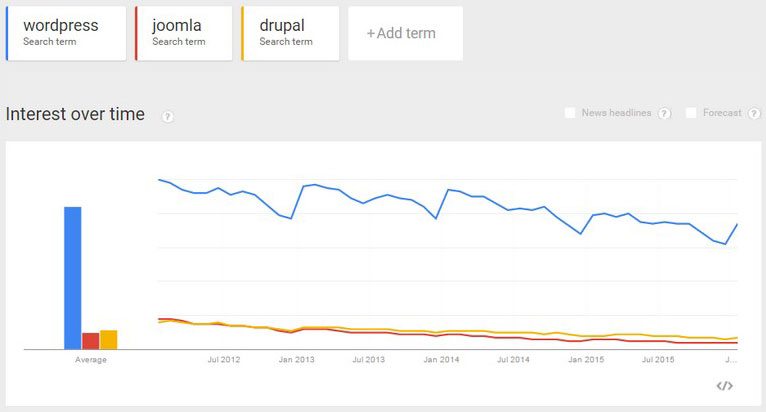
The key for us is how easy it is to use WordPress- as compared to other CMS systems. The author of the following article also said the same thing:

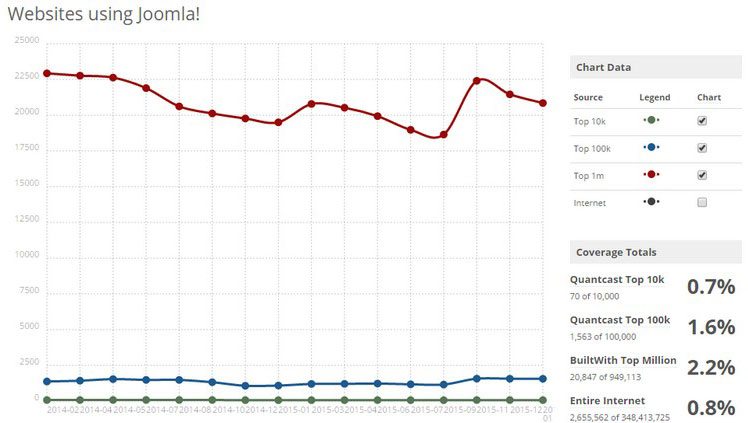
I just know WordPress, and I know it is easy to use (as opposed to, say, Joomla) for not so familiar clients. Add a solid support for “static” content, being the WordPress Pages, and more newsy update flows controlled by the Posts, and you’ve got your needs pretty much covered for most websites online today.

If you can’t use it yourself, and keep your company on the forefront of Industry news and trends, you don’t really have a website. We also see the terrific value WordPress offers as an Search Engine Optimization tool. Use WordPress right- get to the front of Google.
Here is his very helpful checklist:

Checklist for Creating Web Sites with WordPress as the CMS

These are the things I tend to think about before choosing and designing a website where WordPress will be used as the CMS. There’s probably other things as well, things I just haven’t take into account since my clients haven’t had that kind of need yet. Feel free to add yours in the comments, sharing is caring after all.

* Is there even a need for a CMS for the client?

* Is WordPress the correct CMS? Will it fit the needs? Is the translations available for the WordPress backend good enough? How will it be upgraded?

* Will I need to extend WordPress using plugins? Are any hacks to the core necessary, because if they are, how will I make sure that these won’t break when the core is upgraded?

* What types of content will there be, and what should be deemed static (i.e. use Pages), and what is flowing updates (i.e. Posts)? How will I present this, and what is the main type of content?

* How will the permalink structure be? Should it really say “category”, why not “view” or “updates” or something else?

* Will the menu be static (i.e. coded into the theme) or controlled by WordPress (i.e. listing using WordPress tags for Pages and categories)? How could this go wrong in the future?

* What hierarchy will the Pages have? This is important for the URL, since it should be coherent with the menu hierarchy after all.

* How will I present sub-pages (i.e. Pages having a mother Page)? Should there be any at all?

* Do I need Page templates for various sections? How will these work with sub-pages?

* What categories will I use? Should the client be allowed to create new categories?

* How will I present Posts content?

* Do I need category templates for the various categories?

Things To Consider When Using WordPress as a CMS | Devlounge

Although he asks for comments on this post- they don’t seem to have them- but I would add that the issue of using Categories and Tags are still a little fuzzy for most people.

Think of Categories as the table of contents of a book and tags as the index- and you are track to better understanding how they should work. All of his points really don’t apply to people using off the shelf themes- which are the jack of all trades solutions for the most part. To really optimize WordPress as a Content Management System, you are really talking about custom theme development.

We’ve just completed an implementation of WordPress as a CMS on www.girlfriendology.com, head over and take a look.

Tags: , , , | Categories: Build a better site, Content Management, WordPress

CNN Political Ticker: powered by WordPress

CNN Political Ticker screen shot

People often ask- how big a site can I do with Wordpress?

CNN big enough for you?

CNN Political Ticker: All politics, all the time – Blogs from CNN.com

Tags: , | Categories: Build a better site, Content Management, WordPress

WordPress beats other blog CMS systems for SEO

The reason we push WordPress as the CMS for the rest of us is the Google love it gets.

If you want to read all about WordPress vs. TypePad, this article and its comments are worth your time-

I’ve just saved the really good parts here:

A Fool’s Wisdom » TypePad SEO Blows…
WordPress.com and self-hosted WordPress (once you enable permalinks) share the same great SEO, and WordPress is generally recognized as having the best SEO of any web publishing platform out there. We are very fortunate for having numerous SEO experts that have long participated in WordPress development including SEO luminaries like Google’s Matt Cutts.

…On the other hand, not only does WordPress not have either of these problems, if you change the URL after publishing, the old URL will continue to work and forward to the new URL.

I’ve done a few exports from TypePad, one of the most recent being Health.com’s blog. One of the things I did was review the existing search engine optimization and I’ve been repeatedly surprised to find scrapper sites some times show up above the blog in search results. My guess is these two issues at least play a part in this happening.

From the comments:

Well it’s quite easy to see who’s the best by exploring the Google search results. Majority of middleweight to top SEO experts are using either WordPress or a custom built blog soft. Anyone on Typepad? Almost none.

The reality is- if the first page of Google is the promised land, WordPress is the secret key to getting in.

Tags: , , , , | Categories: Build a better site, Search Optimization, WordPress

WordPress 2.6 Beta 1- the return of Press It!

The early indication is 2.6 will bring Press it back- but, maybe, it’s called “Press This” now.

WordPress 2.6 Beta 1 :: geek ramblings
The return of the “Press This” bookmarklet (find it in the sidebar of the Write page). Drag the link to your browser’s bookmarks toolbar, and use it to quickly post about sites you visit.

Yeah- no more need to do the workaround I posted here:

Word Press 2.5 missing Press It function- and how to restore it

Tags: , | Categories: Word Press Interface, WordPress

Trouble in Wordpress 2.5 land

It seems there is quite a bit of frustration with the new “Add media” controls in WordPress 2.5

The 2.5.1 update didn’t fix them- but, at this point, enough people have griped that the development team has to know they laid an egg with this part.

I just grabbed this whole post from the support site to give you the run down, the link at the bottom of the post is from someone who choses much more colorful language to describe his experiences-

WordPress › Support » Problems/steps backward with Add Media functionality
I was quite eager to try the add media functions in v2.5, but it seems either I am missing something or there are some fundamental problems.

Add Video
This seems fundamentally broken. I cannot believe that any user would expect that this would only create a link to a video rather than embedding the actual video. The only good news seems to be that using YouTubes embed code now works in a post without needing to use a plug-in like Easy Tube.

Add an Image
While this works–and the ability to upload multiple images is a plus–the interface to produce even basic functionality seems to have taken a step backwards. Case in point: I wanted to upload an image and have it right-justified with text wrapping around it. I had to go through no less than three dialogue boxes to achieve this.

Step 1: A box for uploading the image and adding ALT text.

Step 2: Requires the user to then click on Gallery for the ability to edit ALT text again, plus set image link, size and basic justification. I am not sure why this cant be rolled into the first step and I am not sure why all the options for justification cant be included here.

Step 3: In order to get the text to wrap, I then need to select the places image, click on the Image button, which pops up a dialogue box similar to what we had in the previous version, which gives the kind of control over the image that SHOULD be in Step 2. And, oddly, the justification selected in Step 2 is not reflected in this dialogue box.

With 2.5, its suddenly more clicks and LESS intuitive than it was before to perform a pretty basic use of an image in a post. It really does seem like at least one of these three steps could be eliminated. In the end, I can get what I want, but now its more involved than it used to be, with a workflow that is not at first obvious.

Add Audio/Add Media
I have not tried these yet, but fear that Audio will produce similar results to video. And its not entirely clear what “Add Media” is for. Flash content? Something else?

But my real issue is with video and these extra steps in just using simple images. Unless someone can show me that I am missing something here. Any help welcome.

If you follow the link, there are some good comments- including mention of the “Flexible Upload” plug in which we are about to start testing.

For the more colorful post- I can’t even post the link- go here.

Tags: , , , , | Categories: Word Press Interface, Word Press Plugins, WordPress, WordPress is broken! Help!

Websitetology Seminar on Monday, January 21st, 2008

The next Websitetology seminars will be held, Monday January 21, 2008

8:30am to 5 pm

Location Nehemiah University, 750 S. Main Street Dayton OH 45410

If you are wondering if you should take this seminar: http://websitetology.com/?p=91

Sign up for it here: http://websitetology.com/?page_id=247

Categories: Advertising on blogs, Build a better site, Conference Speaking on Web 2.0, Content Management, Content opportunities, Future of the web, Internet mastery, On Blogging, Search Optimization, Seminars, Traffic building tips, Web Marketing, Web Software tools, Website tips for small business, WordPress